-How to Pointing a domain in AWS Console Ec2 Engine
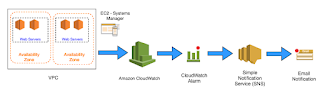 Amazon EC2 provides scalable computing capacity in the AWS cloud. You can launch an EC2 virtual computing environment (an instance) using a preconfigured template (an Amazon Machine Image, or AMI). When you launch an EC2 instance, EC2 automatically installs the operating system (Linux or Microsoft Windows) and additional software included in the AMI, such as web server or database software.

 Amazon EC2 provides scalable computing capacity in the AWS cloud. You can launch an EC2 virtual computing environment (an instance) using a preconfigured template (an Amazon Machine Image, or AMI). When you launch an EC2 instance, EC2 automatically installs the operating system (Linux or Microsoft Windows) and additional software included in the AMI, such as web server or database software.
If you're hosting a website or running a web application on an EC2 instance, you can route traffic for your domain, such as example.com, to your server by using Amazon Route 53.
-Prerequisites
GoDaddy


Aws Console Ec2Service
Load Balancer

-Configuration
Open the dns node to pass the air code from the awsconsole
and also configure ...

Open the dns node to pass the air code from the awsconsole
and also configure ...

Finish setup to check the Registered URL
Comments
Post a Comment